The importance of website security
Website security is critical for all organizations that rely on web applications as a source of revenue, efficiency, and customer insights. Organizations with websites that intake and store sensitive data, or provide critical infrastructure and services, are particularly susceptible to attacks that vary in complexity, scale, and origin.
Web application security as a discipline is broad and ever-evolving, given that the Internet threat landscape and regulatory environment are constantly changing. For example, this checklist focuses on how to protect websites, but protecting APIs and AI-enabled apps (which websites increasingly incorporate) is increasingly important for large enterprises.
However, public-facing websites of all sizes and across all industries can benefit from 'table stakes' measures around technical controls and access control and user management. To that end, this website security guide covers the following 10 recommendations:
[Track and analyze web traffic and security metrics
1) Secure accounts with strong authentication](#trackwebtraffic)
Recommendation: Use 2FA rather than password-only authentication
Just like an airline must verify a passenger’s identity with a valid ID before allowing them to board a plane, organizations must also verify who is logging in to the digital systems powering their web applications.
The process of preventing unauthorized access (by ensuring individuals are who they claim to be) is called authentication. Authentication verifies identity by checking specific characteristics, or "factors," against a digital record.
The following are the most common authentication factors:
Something the person knows: This checks for a piece of secret knowledge that only the real person should have, such as a username-password combination, security questions, or PIN codes.
Something the person has: This checks if the person possesses an item they were issued or are known to have (similar to needing a physical key to open a house’s front door). In digital systems, authentication checks for a soft token (such as a mobile-generated code), or a hard token (such as a small physical item that must be plugged into your device via Bluetooth or USB port), before permitting access.
Something the person is: This assesses a person's inherent physical qualities through biometrics; for instance, by verifying a thumbprint or through facial recognition.
The problem with the first type is that passwords can often be guessed or stolen by attackers. With the prevalence of phishing, on-path attacks, brute force attacks, and password reuse, it has become simpler for attackers to collect stolen login credentials.
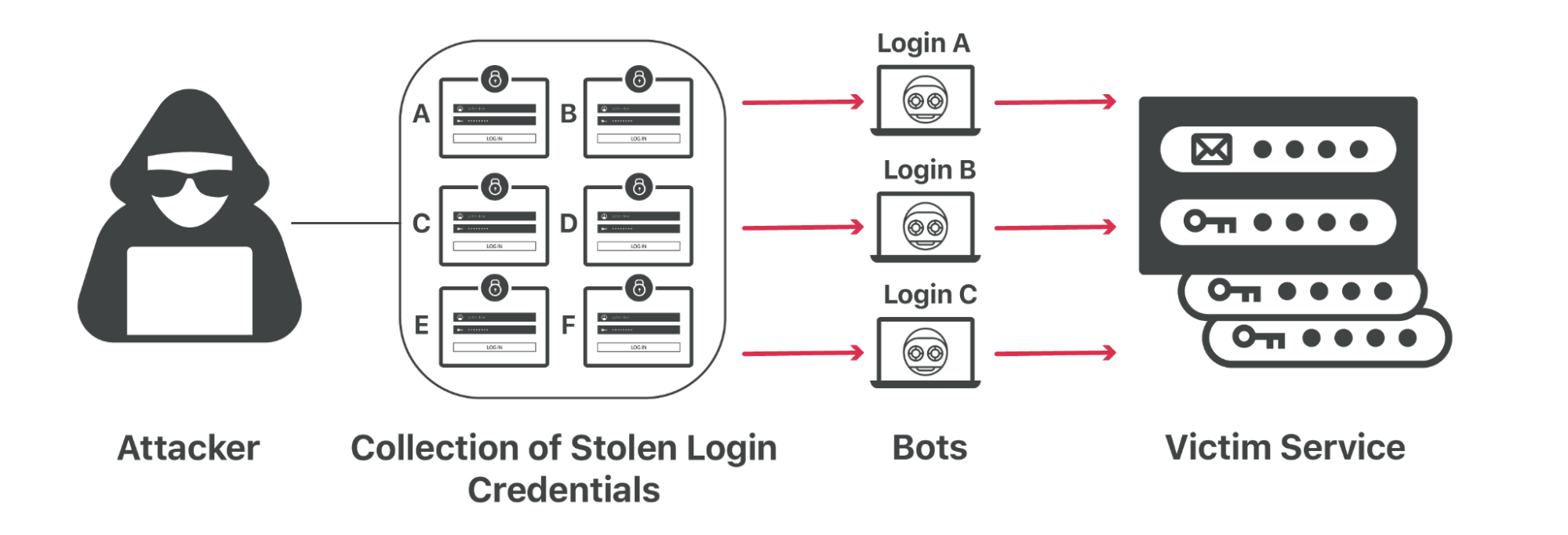
For this reason, organizations should implement two-factor authentication (2FA) for their accounts. 2FA requires (at least) two separate forms of authentication — which is more effective than just requiring one. While 2FA is not impossible for attackers to crack, it is significantly more difficult and expensive to compromise than password-only authentication.
2) Enforce role-based permissions
Recommendation: Set role-based permissions to only authorized users
Just because someone’s identity is verified, however, does not mean they should have control over everything. Authorization helps determine what an authenticated user can see and do (i.e, their permissions).

For example, a “super administrator” may be the only one authorized to edit all settings and pages; whereas a “read-only” user might only be able to view the site’s analytics — and nothing else.
As organizations expand, so do the number of roles on their web teams: there may be front-end developers, back-end developers, security analysts, reporting analysts, web designers, content editors, and much more. Therefore, it is important to regularly audit and update role-based permissions.
3) Encrypt web traffic with SSL/TLS
Recommendation: Establish connections with auto-managed SSL/TLS
Any website that collects and transmits sensitive data, such as login credentials, contact information, credit card information, health information, and more, needs HTTPS. HTTPS prevents websites from having their information broadcast in a way that’s easily viewed by anyone snooping on the network.

HTTPS works through a protocol called Transport Layer Security (TLS) — previous versions of the protocol were known as Secure Sockets Layer (SSL).
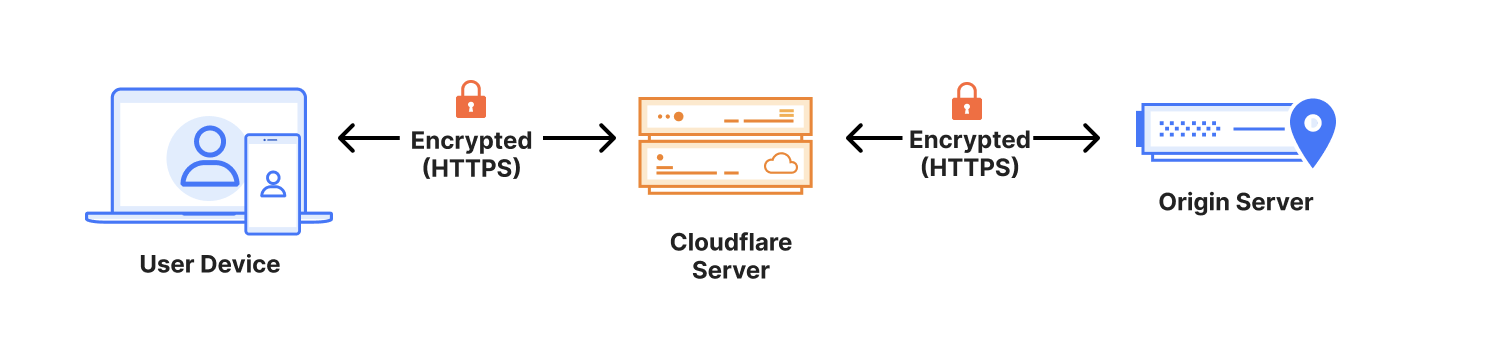
Look for a service that offers auto-managed SSL/TLS certificates, which are what enable websites and applications to establish secure connections.
TLS is the communications backbone of privacy and data security. It allows users to browse the Internet privately, without exposing their credit card information or other personal and sensitive information.
With SSL/TLS, a client (such as a browser) can verify the authenticity and integrity of the server it is connecting with, and use encryption to exchange information. This, in turn, helps prevent on-path attacks and meet certain data compliance requirements.
There are other benefits, too: TLS helps minimize latency to speed up webpage load times, and search engines tend to deprioritize websites that fail to use encryption.
Keep in mind that each SSL/TLS certificate has a fixed expiration date, and the validity periods of these certificates have shortened over time. If a certificate is expired, clients — such as the visitor’s browser — will consider that a secure connection cannot be established, resulting in warnings or errors. Missed certification renewals can also lower a website’s search engine rankings, but certain services can handle auto-renewal.
4) Encrypt DNS traffic over HTTPS or TLS
Recommendation: Keep user browsing secure and private with DNS encryption
A website’s content does not technically live at a URL like www.example.com, but rather at a unique IP address like 192.0.2.1. The process of converting a URL into a machine-friendly IP address is known as a Domain Name System (DNS) lookup; and DNS records are the Internet’s instructions for what IP address is associated with a particular domain.
However, by default, DNS queries and responses are sent in plaintext (UDP), which means they can be read by networks, ISPs, and others who may be monitoring transmissions. This can have huge implications on security and privacy. If DNS queries are not private, then it becomes easier for governments to censor the Internet and for attackers to stalk users' online behavior.
Use a free DNS resolver to encrypt DNS traffic with one of these options:
DNS over TLS, or DoT, is a standard for encrypting DNS queries to keep them secure and private. It gives network administrators the ability to monitor and block DNS queries, which is important for identifying and stopping malicious traffic.
DNS over HTTPS, or DoH, is an alternative to DoT. With DoH, DNS queries and responses are encrypted, but they are sent via the HTTP or HTTP/2 protocols instead of directly over UDP. This gives network administrators less visibility — but provides users with more privacy.
5) Integrate DNS security
Recommendation: Address certain DNS system limitations with purpose-built DNS security
The DNS system itself was not designed with security in mind and contains several design limitations. For example, it does not automatically guarantee where DNS records come from, and it accepts any address given to it, no questions asked. Therefore, DNS servers can be vulnerable to domain spoofing, DoS (Denial of Service) attacks, and more.
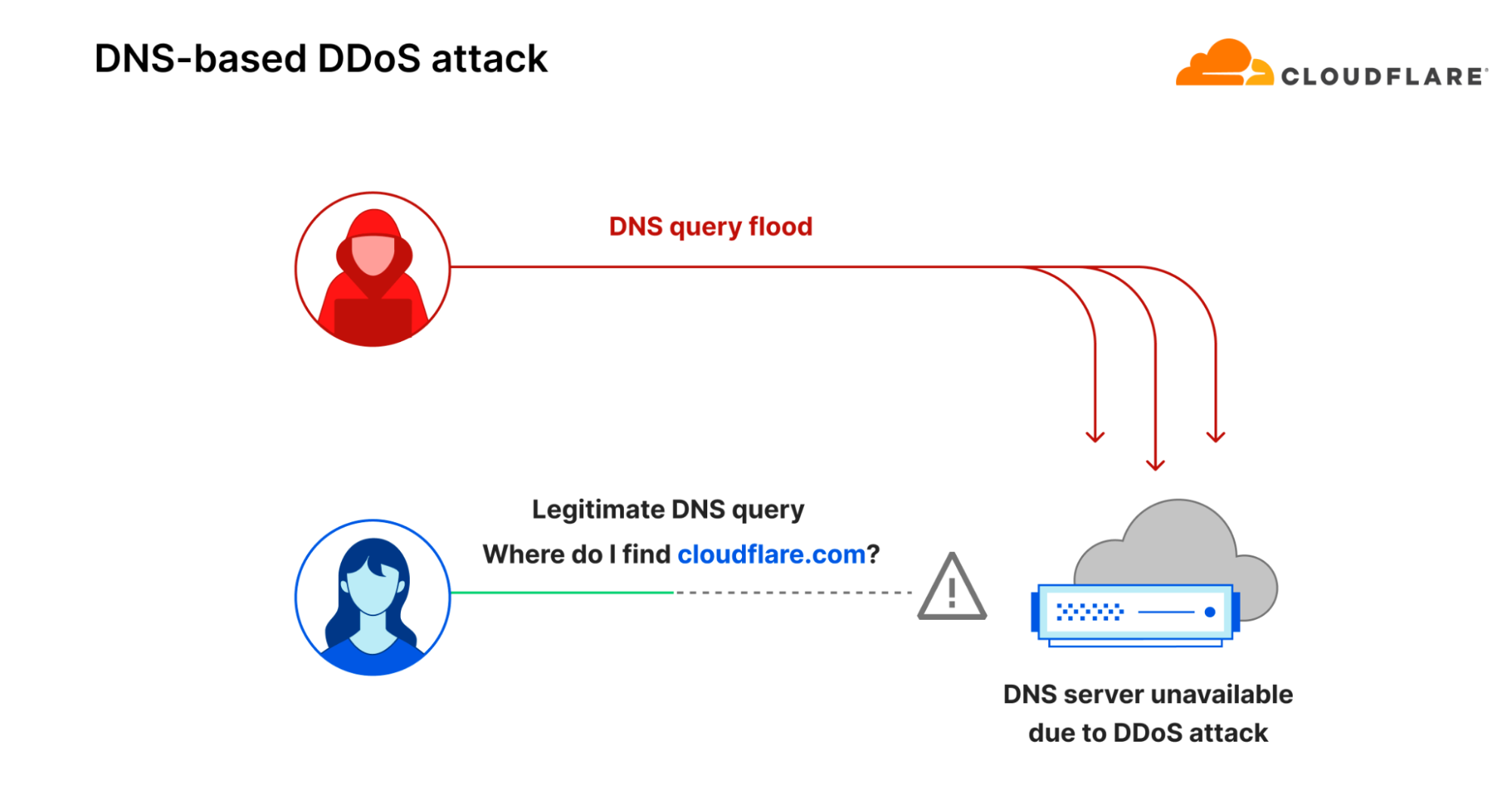
DNS security (DNSSEC) helps address some of the design flaws of DNS. For instance, DNSSEC creates a secure domain name system by adding cryptographic signatures to existing DNS records. By checking its associated signature, organizations can verify that a requested DNS record comes from its authoritative name server — and not a fake record.
Some DNS resolvers already integrate DNSSEC. Also, look for a DNS resolver that can provide features such as content filtering (which can block sites known to distribute malware and spam) and botnet protection (which blocks communication with known botnets). Many of these secured DNS resolvers are free to use, and can be activated by changing a single router setting.
6) Hide the origin IP address
Recommendation: Make it more difficult for attackers to find your server
If attackers were to find the origin IP of an organization’s server (which is where the actual web application resources are hosted), they may be able to send traffic or attacks directly to the servers.
Depending on the DNS resolver already in place, the following steps can also help hide the origin IP:
Do not host a mail service on the same server as the web resource being protected, since emails sent to non-existent addresses get bounced back to the attacker — revealing the mail server IP.
Ensure that the web server does not connect to arbitrary addresses provided by users.
Since DNS records are in the public domain, rotate origin IPs.
7) Prevent DDoS attacks
Recommendation: Implement always-on DDoS mitigation plus rate limiting
At their worst, distributed denial-of-service (DDoS) attacks can knock a website or entire network offline for extended periods of time.
DDoS attacks occur when a large number of computers or devices, usually controlled by a single attacker, attempt to access a website or online service all at once. These malicious attacks are intended to take resources offline and make them unavailable.
Application-layer DDoS attacks remain the most common attack type against web applications — and continue to become more sophisticated in terms of size and frequency.
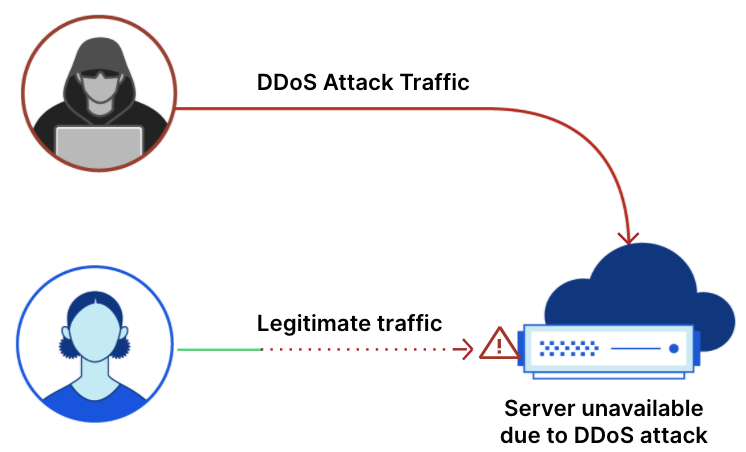
Look for the following essential DDoS prevention tools:
- Always-on DDoS mitigation: Look for a scalable, “always-on” DDoS defense with the following capabilities:
Automatic absorbing of malicious traffic as close as possible to the attack origin (which reduces end-user latency and organizational downtime)
Unmetered, unlimited DDoS attack mitigations (which avoids extra charges from spikes in attack traffic)
Centralized, autonomous protections against all DDoS attack types (including application- and network-layer attacks)
- Rate limiting: Rate limiting is a strategy for limiting network traffic. It essentially puts a cap on how often someone can repeat an action within a certain timeframe — for instance, when botnets attempt to DDoS a web application. This is comparable to a police officer who pulls over a driver for exceeding the road's speed limit. There are two kinds of rate limiting:
Standard IP-based rate limiting, which protects unauthenticated endpoints, limits the number of requests from specific IP addresses, and handles abuse from repeat offenders
Advanced rate limiting, which also protects APIs from abuse, mitigates volumetric attacks from authenticated API sessions, and provides more customization
A comprehensive DDoS threat defense also hinges on multiple methods that may vary depending on an organization’s size, their network architecture, and other factors. Learn more about how to prevent DDoS attacks.
8) Manage third-party scripts and cookie usage
Recommendation: Look for tools specifically to address client-side risks
In web development, “client side” refers to everything in a web application that is displayed or takes place on the client (end user device). This includes what the website user sees, such as text, images, and the rest of the UI, along with any actions that an application performs within the user's browser.
The majority of client-side events require loading JavaScript and other third-party code to the web visitor’s browser. But, attackers look to compromise those dependencies (for example with Magecart-style attacks). This leaves visitors vulnerable to malware, credit card data theft, crypto mining, and more.
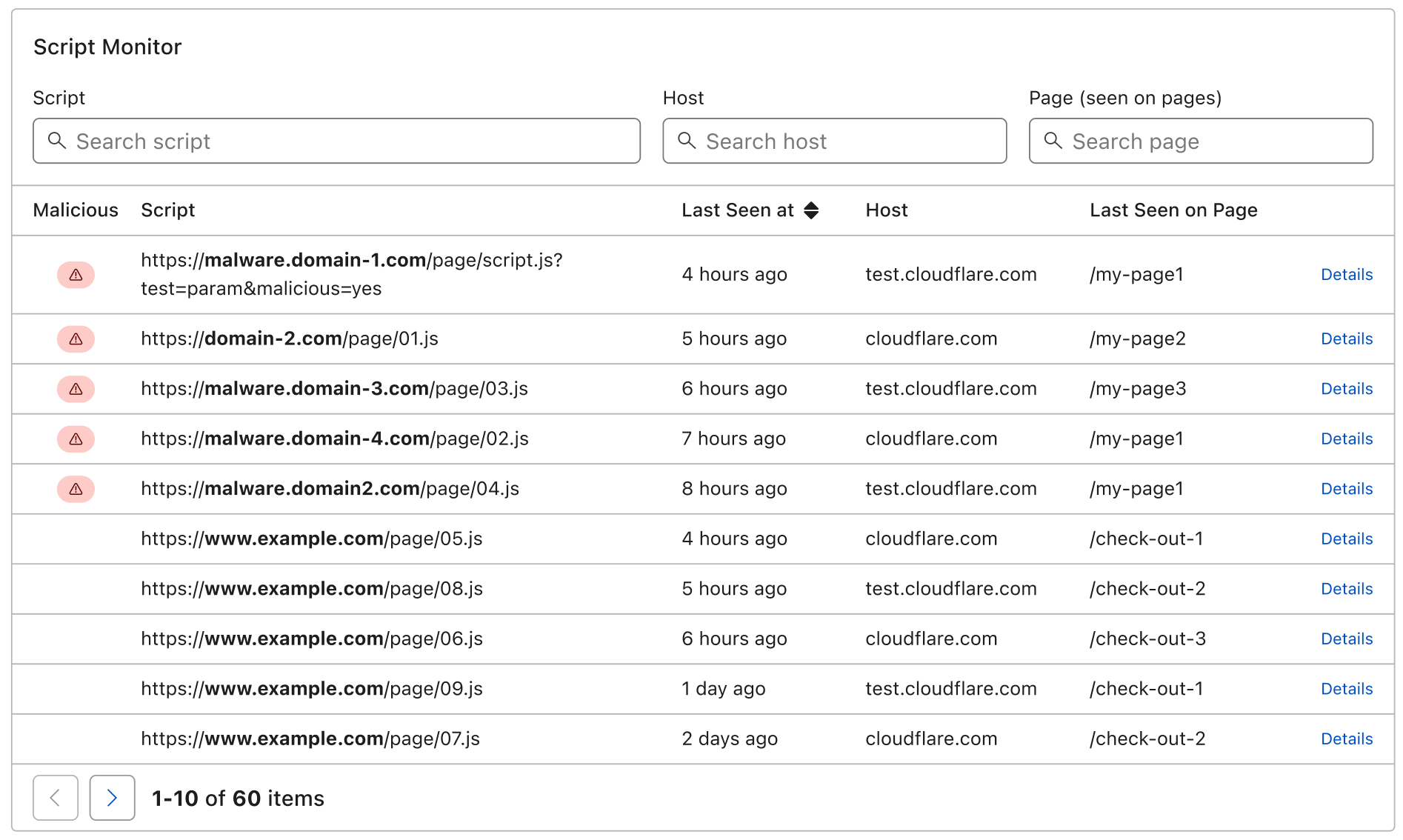
Cookies also come with client-side risks. For example, an attacker can exploit cookies to expose website visitors to cookie tampering, which can ultimately lead to account takeover or payment fraud. However, website administrators, developers, or compliance team members often do not even know what cookies are being used by their website.
To reduce the risk from third-party scripts and cookies, implement a service that:
Automatically discovers and manages third-party script risks; and
Provides full visibility into first-party cookies being used by websites.
9) Block bots and other invalid traffic
Recommendation: Proactively identify and mitigate malicious bot traffic
Some bots are “good” and perform a needed service — such as authorized search engine crawlers. But, other bots are disruptive and harmful when left unchecked.
Organizations that sell physical goods or services online are particularly vulnerable to bot traffic. Too much bot traffic can lead to:
Performance impact: Too much bot traffic can put a heavy load on web servers, slowing or denying service to legitimate users
Operational disruptions: Bots can scrape or download content from a website, rapidly spread spam content, or hoard a business' online inventory
Data theft and account takeovers: Bots can steal credit card data, login credentials, and take over accounts
Look for a bot management service that:
Accurately identifies bots at scale by applying behavioral analysis, machine learning, and fingerprinting to a vast volume of traffic
Allows good bots, such as those belonging to search engines, to keep reaching the site while still preventing malicious traffic
Integrates easily with other web application security and performance services
10) Track and analyze web traffic and security metrics
Recommendation: Improve web security with data-driven decisions
Analytics and logs with actionable data are important for improving web performance and security on an ongoing basis.
For example, logs and application security dashboards can provide insights into:
Potential threats in HTTP traffic, so that errors affecting end users can be identified and debugged
Attack variations and their malicious payloads (for example, injection attacks vs. remote code execution attacks), so that systems can be ‘tuned’ and hardened accordingly
DNS query traffic, and the geographical distribution of queries over time to spot anomalous traffic
Visibility into web traffic analytics is a key component for continuous risk assessment. With it, organizations can more informed decisions about how to improve their application performance, and where to boost their security investments.
How does Cloudflare help secure websites?
Cloudflare’s connectivity cloud simplifies web application security and delivery, with a full suite of integrated services that connect and protect organizations’ web applications and APIs.
These services include DDoS protection, an industry-leading web application firewall (WAF), bot management, client-side security, an API gateway, a free public DNS resolver, free SSL/TLS certificates, comprehensive web performance and security analytics, and much more.
Discover the services that fit your website’s needs at www.cloudflare.com/plans.
FAQs
Why is two-factor authentication (2FA) recommended over using passwords alone?
While passwords can be easily guessed, stolen through phishing, or collected via brute force attacks, 2FA requires at least two different forms of identification. This makes it much more difficult and expensive for an attacker to compromise an account compared to using only a password.
How does role-based authorization protect a website?
Role-based authorization ensures that even verified users can only access the specific tools and data necessary for their roles.
What are the security benefits of using SSL/TLS encryption?
SSL/TLS secures web traffic by encrypting sensitive data like login credentials and credit card information, protecting users from on-path attacks. It also helps authenticate the identity of the web server for the user so that they are less likely to load a spoofed copy of the website.
How do DNS over TLS (DoT) and DNS over HTTPS (DoH) improve user privacy?
Standard DNS queries are sent in plaintext, meaning they can be monitored by ISPs or third parties. DoT and DoH encrypt these queries, preventing others from stalking a user’s online behavior or censoring their access to the Internet.
What is DNSSEC and what specific flaw does it address?
The original DNS system cannot guarantee the source of a record, making it vulnerable to spoofing. DNSSEC addresses this by adding cryptographic signatures to DNS records, allowing an organization to verify that a record came from its legitimate authoritative nameserver.
Why should an organization hide its origin IP address?
If an attacker discovers the origin IP address where web resources are hosted, they can bypass security layers and send malicious network traffic directly to the server. Strategies like rotating IPs and hosting mail services on a different server from web resources help keep this address hidden.
What capabilities should a scalable DDoS mitigation service provide?
An effective defense should be always-on and capable of automatically absorbing malicious traffic near its source to reduce downtime. It should also offer unmetered mitigation to avoid extra costs during large-scale attacks.
How does rate limiting help defend against botnets?
Rate limiting acts like a speed limit for network traffic by capping how many times an action can be repeated within a specific timeframe. This prevents botnets from overwhelming a web application with a high volume of requests, and it can stop some malicious bot attacks like brute force attacks or credential stuffing.
What risks are associated with third-party scripts and cookies?
Third-party code can be compromised by attackers to steal data or spread malware directly on the user's browser. Similarly, unmanaged cookies can be exploited for account takeover or payment fraud if they are not properly monitored.
How do web traffic analytics contribute to long-term security?
Analytics and logs provide actionable data that helps organizations identify potential threats, debug errors, and understand different attack variations. This visibility allows for data-driven decisions on where to harden systems and where to prioritize security investments.